
Your Firestick updated overnight and now your IPTV app is blocked, disabled, or refusing to install. You didn't do anything wrong. Amazon pushed changes to Fire OS in late 2025 that block apps at the installation stage — not just at launch. There are three separate reasons this can happen, and the fix depends entirely on which one applies to your device. This guide identifies your specific block type and gives you the safe, legitimate path to fix it.
Three Different Blocks — Same Error Message, Different Causes
"App Installation Blocked" and "App Disabled" look identical on screen. That's the frustrating part — these messages cover three completely different technical situations, and most troubleshooting guides treat them as one problem. Apply the wrong fix and you waste an hour getting nowhere.
The distinction matters because each cause has a different root and a different solution. Check which type you have first. Then go directly to that fix.
Block Type 1 — ACE package blacklist. Amazon's App Verification system, rolled out from Fire OS 8.1.5+ in late 2025, cross-references every APK's internal package name against a database maintained with the Alliance for Creativity and Entertainment (ACE). If the package name matches, the install is terminated immediately — before the app touches the device's storage. This is a hard block at the package level, not the app's display name. An app can call itself anything; if its underlying package name appears in the ACE database, installation fails.
Block Type 2 — Post-update harmful app detection. Separate from the install-time check, Amazon pushed firmware updates in late 2025 that retroactively scan apps already installed on the device. If an installed app's signature matches a flagged entry, it gets removed silently — no warning during use, no crash, the app simply disappears after an overnight update. The rollout is gradual and regional, which is why some users hit this months before others running the same Fire OS version.
Block Type 3 — Vega OS hardware incompatibility. Not a policy block at all. Vega OS is Amazon's Linux-based operating system introduced on new Fire TV hardware in October 2025. It cannot run APK files at the architecture level — APKs are Android packages, and Vega OS is not Android. There is no Developer Options toggle, no ADB method, and no workaround that makes APK installation work on Vega OS. The only path forward is apps from the Amazon App Store.
Which type of block do you have?
| What You See | When It Happens | Cause | Device | Fix |
|---|---|---|---|---|
| "App Installation Blocked" | During fresh APK install | ACE package blacklist (Fire OS 8.1.5+) | Fire OS 7/8 | Fix A |
| App disappeared after update | After overnight Fire OS update | Post-update harmful app scanner | Fire OS 7/8 | Fix B |
| APK won't install — no error | Any time | Vega OS — not Android | Vega OS | Fix C |
| "Unverified App" warning — still installs | During sideload | General security prompt (not a hard block) | Fire OS 7/8 | Tap Install anyway |
| "This app has been disabled" | On app launch | Harmful app detection post-install | Fire OS 7/8 | Fix B |
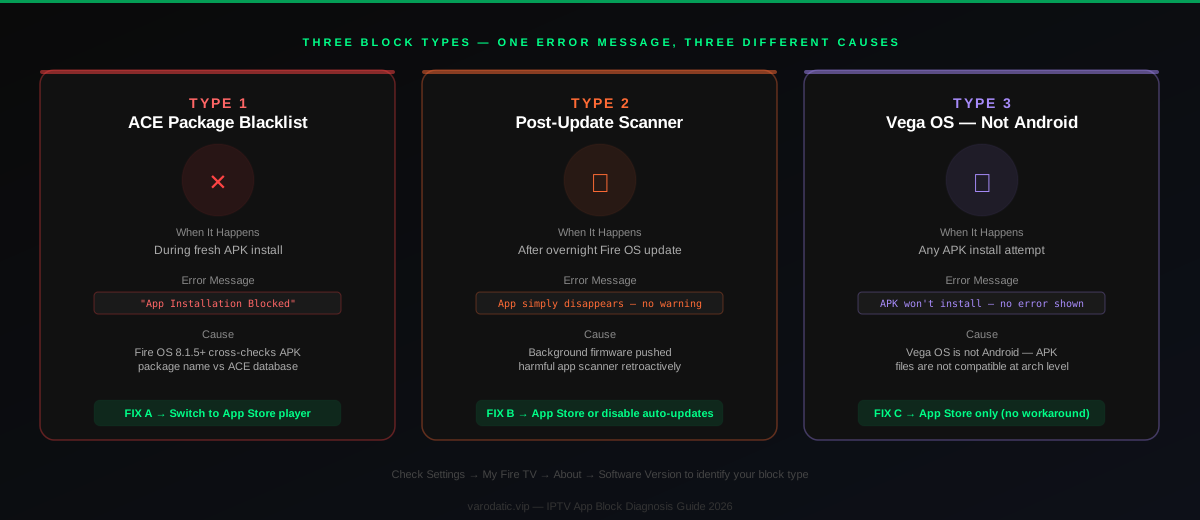
Which Block Type Do You Have?
Check Settings → My Fire TV → About → Software Version first. That single number determines which of the next three fix sections applies to you.
Settings → My Fire TV → About.- Shows Fire OS 7 or Fire OS 8: You have a sideloading-capable device. Your block is Type 1 or Type 2. Continue below.
- Shows Vega OS or no Fire OS version number: You have a Vega OS device. Skip directly to Fix C.
- Appeared during a fresh install attempt → Type 1 (ACE blacklist block). See Fix A.
- App was installed and working, then disappeared after an update → Type 2 (post-update scanner). See Fix B.
⚠️ This guide is for legitimate IPTV subscribers only. The fixes below work by switching to App Store apps or alternative players — not by bypassing Amazon's piracy blocks. If your provider is a paying service like Varodatic, these fixes work cleanly and without risk.
Fix A — "App Installation Blocked" During Install (Type 1)
The ACE package blacklist checks the app's internal package name at install time. If it matches, the install stops before the app reaches device storage. The fix is switching to a player whose package name is not on the list.
Amazon's App Verification system, introduced in Fire OS 8.1.5+, checks the package name of every APK against the ACE database. The block operates at the package name level — not the app's display name. An app called "My Player" still gets blocked if its underlying package name was registered in the ACE database by a different publisher. The rollout is gradual and region-dependent, which means some Fire OS devices hit this earlier than others on identical firmware versions. If a user in another region reports seeing the block weeks before you do on the same Fire OS build, this is why.
Fix A1 — Switch to an App Store IPTV player
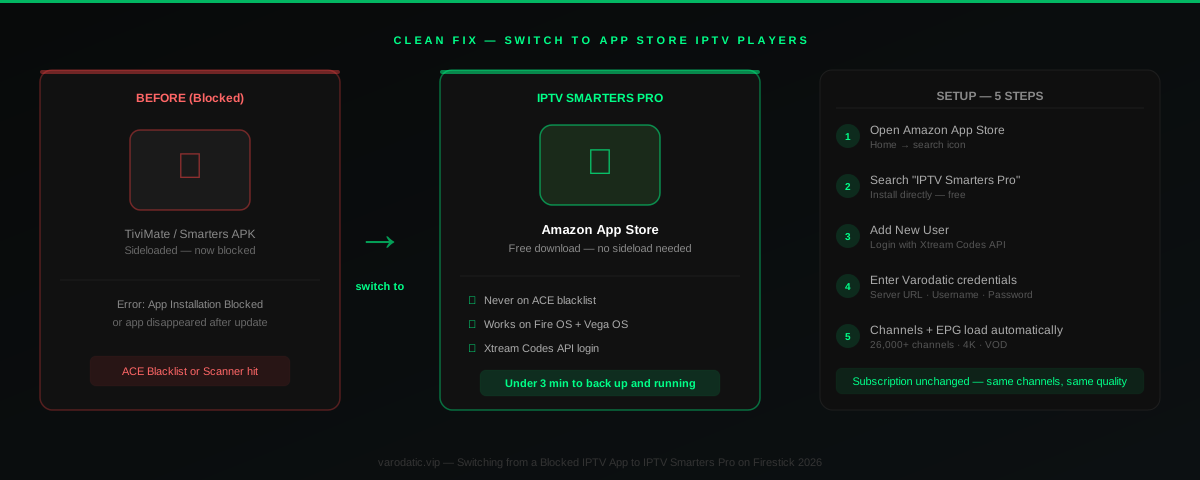
Varodatic IPTV supports Xtream Codes credentials in any compatible player. IPTV Smarters Pro and XCIPTV are both available in the Amazon App Store and install on any Fire OS or Vega OS device without triggering any block. Both load the full channel list, EPG, and VOD automatically through Xtream Codes login — same credentials, same channels, different interface.
💡 IPTV Smarters Pro is the fastest path. It's free, it's on the App Store, and entering your Xtream Codes credentials gets everything running in under 2 minutes. For a complete walkthrough with screenshots, see our Firestick setup guide. If you run into any launch issues with Smarters after installation, the IPTV Smarters troubleshooting guide covers the common crash and freeze causes.
Fix A2 — Try a different APK version (advanced, Fire OS only)
Older APK versions of some players predate their package name's ACE registration and may not yet be in the database. This is not a reliable long-term fix — Amazon updates the list continuously — but it resolves installs for some users in the short term. Only relevant for Fire OS devices, not Vega OS. For ADB setup and the current Developer Options path on both Fire OS and Vega OS, the Developer Options guide covers the exact steps per firmware version.
Fix B — App Disappeared After a Fire OS Update (Type 2)
If an app you were using daily suddenly vanished after an overnight Fire OS update, Amazon's post-install harmful app scanner removed it. It didn't crash. It wasn't uninstalled by you. It was deleted by the scanner.
Amazon pushed silent firmware updates in late 2025 that retroactively scan installed apps against a signature database. This is separate from the install-time block — the app was already on the device and working, then a background update pushed a new scanner signature that flagged it and removed it silently. The user experience is indistinguishable from a crash or bug, which is why many people waste time reinstalling the same APK and hitting the same removal cycle. Checking Settings → Applications → Manage Installed Applications shows the app entirely absent, not paused or closed.
Fix B1 — Switch to App Store player (permanent fix)
The same fix as Fix A1 — and the most permanent solution. IPTV Smarters Pro via the App Store is an Amazon-approved listing. It does not get caught in post-update sweeps because it passed Amazon's own review. Set it up once, and future Fire OS updates do not affect it.
Fix B2 — Disable automatic updates (temporary measure)
Settings → My Fire TV → About → Automatic Updates → Off
This stops future updates from pushing the scanner to your device. Existing sideloaded apps stay installed. This is a temporary measure, not a permanent fix — Amazon can push updates through secondary mechanisms, and disabling automatic updates also means missing security patches.
⚠️ Turning off automatic updates has real trade-offs. Security patches stop arriving while updates are disabled. Re-enable periodically and verify your current app setup still works after each update cycle. Treat this as time you're buying to set up a permanent App Store solution.
Fix B3 — Reinstall via ADB (advanced, Fire OS only)
On Fire OS devices, ADB (Android Debug Bridge) installations sometimes persist longer than Downloader-based installs because the install path is different. Requires enabling ADB Debugging at Settings → My Fire TV → Developer Options → ADB Debugging, then connecting from a computer using Android Debug Bridge tools. Not a guaranteed long-term fix, but it buys more time than a standard Downloader reinstall for users who need it while transitioning to an App Store player.
Fix C — Vega OS Device: No Sideloading Available (Type 3)
If your device shows Vega OS in the About screen, there is no fix for APK installation. Vega is not Android. APKs are Android packages. No setting changes this.
Vega OS is Amazon's Linux-based operating system, introduced on Fire TV hardware in October 2025. It cannot run APK files at the architecture level. This is not a permissions setting or a Developer Options toggle. No Downloader method, no ADB method, and no configuration option installs Android APKs on Vega OS. If a guide tells you it can be done, that information is incorrect.
The only option is apps from the Amazon App Store. For Varodatic subscribers, that means IPTV Smarters Pro — which supports your Xtream Codes credentials fully and loads channels, EPG, and VOD automatically.
💡 What about TiviMate? TiviMate is Android-only and has no App Store version. On a Vega OS device it is not an option — not blocked by policy, just architecturally incompatible. If TiviMate is a hard requirement for your setup, the Firestick 4K Max 2nd generation still runs Fire OS and is sold alongside the Vega OS models. For a full breakdown of which devices run which OS and what each supports, see Vega OS and Fire TV explained.
Which IPTV Players Are Actually Blocked vs Which Are Not
The ACE database targets specific piracy app packages — software designed to stream copyrighted content without payment. It does not target the category of IPTV players. The distinction matters because a lot of coverage conflates the two, which causes legitimate paying subscribers to think their entire setup is under attack. It isn't.
Not blocked as of May 2026:
TiviMate is a neutral IPTV player with no piracy content built in. It requires you to provide your own content source — it ships with no built-in streams, no free channels, nothing. Amazon's detection has triggered install warnings on some Fire OS 8 builds during sideloading, but TiviMate installs successfully on most current Fire OS 7 and 8 devices. If it is being blocked specifically on your device, the ADB install method tends to succeed where Downloader fails. The best IPTV players for Firestick guide covers current compatibility by device model and app version.
IPTV Smarters Pro is on the App Store — never blocked. XCIPTV is on the App Store — never blocked. OTT Navigator installs via sideload on Fire OS and is not on the ACE blacklist. GSE Smart IPTV installs via sideload on Fire OS and is not blacklisted.
What is actually blocked: Cinema HD, BeeTV, FilmPlus, and similar apps with specific package names registered in the ACE database. These apps provide free access to copyrighted content without any subscription. They are not IPTV players — they are entirely different software. Legitimate paying subscribers on services like Varodatic IPTV were never the target of these blocks.
IPTV App Status — Fire OS and Vega OS (May 2026)
| App | ACE Blacklist | Fire OS Install | Vega OS | App Store Available |
|---|---|---|---|---|
| IPTV Smarters Pro | ❌ Not listed | ✅ Works | ✅ Works | ✅ Yes |
| TiviMate | ❌ Not listed | ✅ Works (sideload) | ❌ Android only | ❌ No |
| XCIPTV | ❌ Not listed | ✅ Works | ✅ Works | ✅ Yes |
| OTT Navigator | ❌ Not listed | ✅ Works (sideload) | ❌ Android only | ❌ No |
| Cinema HD / BeeTV / FilmPlus | ✅ Blacklisted | ❌ Blocked | ❌ N/A | ❌ No |
Does the Block Affect Your Varodatic Subscription?
No. Amazon's app blocking targets the player software installed on the Firestick — not the IPTV service or subscription behind it. Your Varodatic subscription, credentials, and channel access are completely unaffected by what Amazon does to app installation on Fire OS or Vega OS.
Your subscription lives on varodatic.vip servers. Amazon has no access to those servers and no mechanism to interfere with them. The player app is just the interface — switching from TiviMate to IPTV Smarters Pro changes the window, not what's behind it. The same 40,000+ channels, 4K stream quality, EPG data, and VOD library are there in any compatible player.
Your Xtream Codes credentials — Server URL, Username, Password — are portable. They work in any compatible player, whether it came from the App Store or was sideloaded. The blocking is entirely at the device software level and has no server-side dimension. Nothing about your account, your plan, or your access changes when a player app gets removed from your Firestick.
💡 Not subscribed yet? The full setup — App Store install plus Xtream Codes login — takes under 3 minutes on any Firestick. Start a free Varodatic trial to get your credentials and test it today.
Preventing Future Blocks — Practical Steps
Settings → My Fire TV → About before an update hits gives you advance warning when user reports start appearing for your firmware version.Frequently Asked Questions
Why is my IPTV app blocked on Firestick after an update?
Amazon introduced an App Verification system in Fire OS 8.1.5+ that checks every APK's package name against the ACE blacklist at install time, and retroactively scans installed apps via firmware updates. If an app's package name is on that list, it gets blocked or removed. This targets apps providing free access to pirated content. Legitimate IPTV player apps like TiviMate and IPTV Smarters Pro are not on the list. If your player was blocked, switching to IPTV Smarters Pro from the Amazon App Store is the clean fix.
My IPTV app disappeared from my Firestick overnight — what happened?
A background Fire OS update pushed Amazon's harmful app scanner to your device. The scanner identified your installed app as matching a flagged package and removed it silently — no error during use. Check Settings → Applications → Manage Installed Applications to confirm it is gone rather than just closed. Install IPTV Smarters Pro from the Amazon App Store — it will not be caught by future scanner sweeps.
Does this block affect my IPTV subscription?
No. Amazon's blocking targets the player app on the Firestick — not the IPTV service or account behind it. Your subscription credentials, channel access, and content are on your provider's servers and completely unaffected. Switching from a blocked player to IPTV Smarters Pro gives you the same channels, EPG, and VOD through a different interface.
Is TiviMate blocked on Firestick?
TiviMate is not on Amazon's ACE blacklist — it is a neutral IPTV player with no built-in content. Some users report install warnings on Fire OS 8 builds, but TiviMate installs successfully via sideload on most current Fire OS 7 and 8 devices. On Vega OS devices, TiviMate is unavailable — not because it is blocked, but because Vega OS cannot run Android apps. See the full Vega OS guide for which devices run Vega OS and what works on them.
Can I still use IPTV on Firestick after the 2026 blocks?
Yes. IPTV Smarters Pro is on the Amazon App Store and works on every Fire OS and Vega OS Firestick sold in 2026. Enter your Varodatic Xtream Codes credentials and your full channel list loads in under two minutes. The blocking targets piracy-focused free streaming apps, not IPTV player apps used with paid subscriptions.
App blocking on Firestick is real — but it does not reach paying subscribers at the subscription level. Your service sits on servers Amazon has no access to. The player app is just the window, and IPTV Smarters Pro is a window Amazon has approved and put in its own App Store. Install it, enter your credentials, and you are back up in under three minutes. If you want the TiviMate experience back, a Firestick 4K Max on Fire OS still supports it fully. For anything else, contact Varodatic support — the team responds in under 15 minutes on WhatsApp.
Related Articles

How to Set Up Varodatic IPTV on Firestick (2026 Guide)
Get Varodatic IPTV running on your Firestick in under 10 minutes. Step-by-step 2026 guide — no jailbreak needed, works on all Fire TV models.
Read Article
IPTV Smarters Keeps Crashing on Firestick — 9 Fixes That Actually Work
IPTV Smarters crashing on Firestick? We cover all 9 causes — corrupt cache, low RAM, hardware decoding conflicts, ISP throttling — with exact steps to fix each one.
Read Article
Fire TV Vega OS Explained: Will IPTV Apps Still Work on New Firesticks in 2026?
Amazon's Vega OS is shipping on all new Firestick hardware. Here is what actually changed for IPTV users, which apps are confirmed compatible, and how sideloading works on the updated system.
Read Article