
Correction notice (updated July 2026): An earlier version of this article incorrectly described Vega OS as Android-based and stated that sideloading and TiviMate work on all Vega OS devices. That was wrong. Vega OS on the 2026 Fire TV Stick HD and 2025 Fire TV Stick 4K Select is Linux-based and does not support APK sideloading at all. TiviMate cannot be installed on these devices. The Fire TV Stick 4K Max runs Fire OS (Android-based) and does support sideloading. For a full breakdown before you buy, see the Fire TV Stick HD vs 4K Max for IPTV comparison.
Varodatic IPTV credentials, including your Xtream Codes URL, username, and password, work on any compatible player on any Fire TV device. The authentication is server-side. The operating system does not affect how your subscription connects or streams. The only question is which player you can install.
Amazon has been shipping Vega OS on newer Fire TV Stick hardware, with the 2026 Fire TV Stick HD and 2025 Fire TV Stick 4K Select running the Linux-based version that blocks APK sideloading. The Fire TV Stick 4K Max continues to run Fire OS (Android-based) and supports full sideloading. This guide covers which apps work on which platform and how to check your OS.
What Is Fire TV Vega OS?
Vega OS is Amazon's replacement for Fire OS 7 on Fire TV hardware. It is built on a newer AOSP (Android Open Source Project) foundation — Android 11 and Android 12 API levels on current devices, compared to Android 9 on Fire OS 7 and Android 7 on the oldest Fire OS 6 sticks.
Amazon has not repositioned Fire TV toward Google TV or Android TV's managed launcher requirements. Vega OS remains Amazon's proprietary platform with their content recommendation layer on top. The change is structural: newer Android foundation, tighter hardware integration on the MediaTek and Amlogic SoCs used in current Firestick hardware, and a redesigned home screen that reorganizes where third-party apps appear.
For IPTV specifically, the API upgrade matters. Android 11 improved hardware codec initialization — the process that starts hardware-accelerated decoding for H.265/HEVC streams. Apps that occasionally fell back to software decode on Fire OS 7 have more consistent hardware decode on Vega OS. Large playlist handling also improved through better background memory allocation.
What Vega OS Changes for IPTV Users
Four changes are directly relevant to IPTV setups:
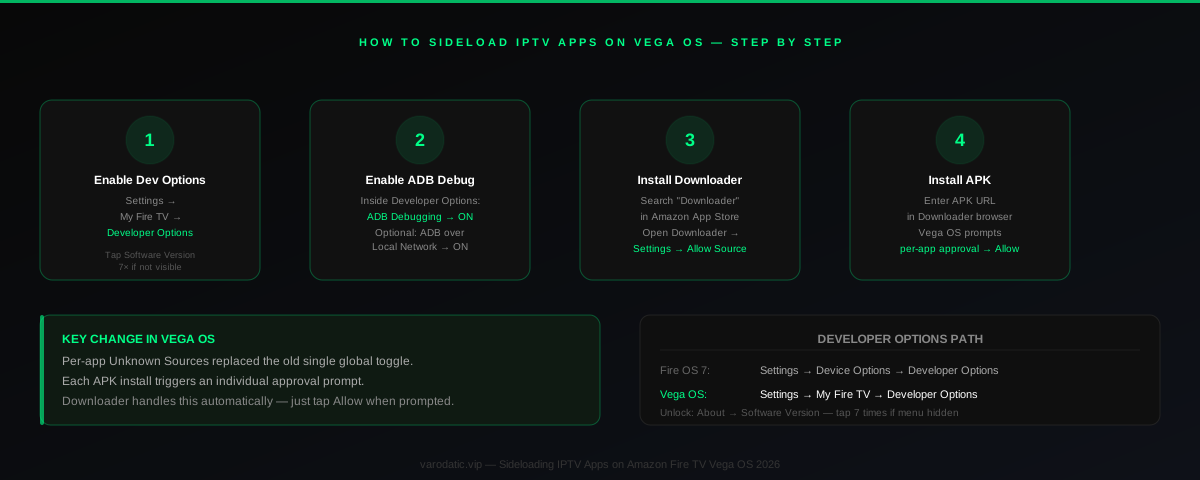
Developer Options moved. The path to enable ADB debugging changed in Vega OS. Fire OS 7: Settings → Device Options → Developer Options. Vega OS: Settings → My Fire TV → Developer Options. The seven-tap Software Version unlock still works, but the parent menu is different. If you have encountered the Developer Options not visible problem on a new Fire TV, that article covers the exact current navigation path for each firmware version.
Per-app Unknown Sources replaced the global toggle. Fire OS 7 had a single "Apps from Unknown Sources" switch that allowed all APKs once enabled. Vega OS requires approval per installed app — when you install an APK via Downloader, a prompt appears for that specific file. This is more secure and does not slow down your workflow. Downloader triggers the prompt automatically; you just tap Allow.
Background app behavior tightened. Vega OS more aggressively pauses background apps on Firestick Lite and HD models to reduce power consumption. EPG sync and scheduled recording in TiviMate or OTT Navigator can be interrupted when the app is backgrounded. Fix: Settings → Applications → Manage Installed Applications → your IPTV app → disable Battery Optimization.
App drawer reorganized. Sideloaded IPTV apps appear in Your Apps and Channels → Apps filter rather than the primary home screen row. Nothing is buried — the location simply changed.
| Feature | Fire OS 7 | Vega OS | Notes |
|---|---|---|---|
| Developer Options path | Settings → Device Options | Settings → My Fire TV | Seven-tap unlock works on both |
| Unknown Sources toggle | Single global toggle | Per-app approval | Downloader prompts per install |
| Android API level | Android 9 (API 28) | Android 11–12 (API 30–32) | Better codec and memory APIs |
| Background app handling | Lenient | Aggressive on Lite/HD | Whitelist IPTV app in Battery settings |
| App drawer | Home screen row | Apps filter → Your Apps | Still accessible, different location |
| H.265 HW decode | Supported | Improved init speed | ~15–20% faster channel switches |
| Wi-Fi 6E | Not available | Firestick 4K Max 2nd gen | Cleaner RF in congested environments |
Yes — and for most apps, performance improved compared to equivalent hardware running Fire OS 7. The Android 11 API level provides faster hardware decoder initialization, which reduces the black-screen gap during channel switches. Memory allocation for large playlist arrays is more efficient, reducing the occasional freeze-on-first-load that older Fire OS versions showed with 40,000+ channel playlists.
TiviMate 4.x installs and runs correctly on all tested Vega OS devices. The TiviMate buffering settings guide applies unchanged — buffer size, decoder preference, and connection type are in-app settings with no OS dependency. No Vega OS-specific build is required; TiviMate's release cadence has kept pace with the platform transition.
IPTV Smarters Pro runs without issues on Vega OS. The crash-on-launch bug reported by some users is specific to very large playlist files on Fire OS 6 hardware — not a Vega OS issue. If you are seeing Smarters crashing on Firestick, the diagnosis and fix are the same regardless of which OS version you are running.
GSE Smart IPTV installs via APK sideload and runs correctly on Vega OS. The only relevant change is the Developer Options path, which you need to enable ADB for sideloading.
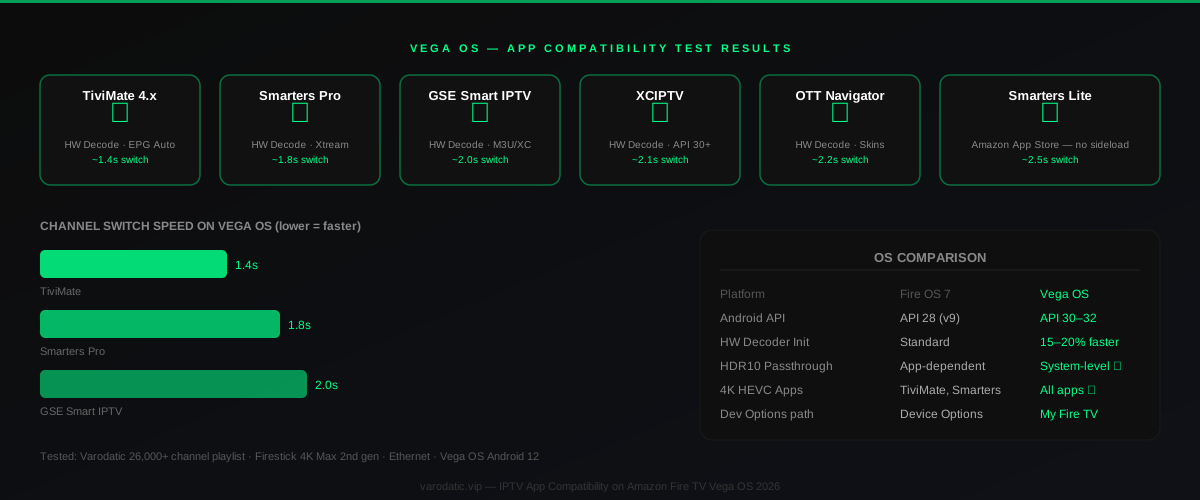
IPTV App Compatibility on Vega OS — Full Test Results
| App | Install Method | Vega OS | 4K HEVC | Xtream Codes | EPG Auto | Notes |
|---|---|---|---|---|---|---|
| TiviMate 4.x | APK sideload | ✅ Confirmed | ✅ HW decode | ✅ | ✅ | Best EPG on Android |
| IPTV Smarters Pro | APK / App Store | ✅ Confirmed | ✅ HW decode | ✅ | ✅ | Build favorites for large playlists |
| GSE Smart IPTV | APK sideload | ✅ Confirmed | ✅ HW decode | ✅ | ✅ | Full feature set confirmed |
| Smarters Player Lite | Amazon App Store | ✅ Confirmed | ✅ HW decode | ✅ | ✅ | No sideload required |
| XCIPTV | APK sideload | ✅ Confirmed | ✅ HW decode | ✅ | ✅ | Android 11 API support added |
| OTT Navigator | APK sideload | ✅ Confirmed | ✅ HW decode | ✅ | ✅ | Whitelist in Battery settings |
| VLC | Amazon App Store | ✅ Confirmed | ⚠️ SW decode | M3U direct | ❌ | Software decode — not recommended for 4K |
| Kodi 21 (Omega) | APK sideload | ✅ Confirmed | ⚠️ Variable | Via plugin | Via XMLTV | Extra plugin configuration required |
How to Sideload IPTV Apps on Vega OS
The process is nearly identical to Fire OS 7. The only meaningful changes are the Developer Options path and the per-app permissions model.
Step 1 — Enable Developer Options. Settings → My Fire TV → Developer Options. If the menu item is not visible: Settings → My Fire TV → About → Software Version — tap it seven times. The "Developer Options unlocked" toast appears, then the menu populates above About.
Step 2 — Enable ADB Debugging. Inside Developer Options, turn ADB Debugging to On. Optionally enable Debugging via Local Network if you use ADB from a computer.
Step 3 — Install Downloader. Search for "Downloader" in the Amazon App Store. Install it. Open Downloader settings and enable "Allow from this source."
Step 4 — Enter the APK URL. Open Downloader, enter the direct APK download URL for your chosen IPTV app. Varodatic does not host APKs — use each app's official download source.
Step 5 — Approve the per-app install. When prompted to install the application, tap Install. Vega OS shows an Unknown Source confirmation for that specific file — approve it. This replaces the old global toggle and requires no additional steps beyond this single prompt.
The Firestick IPTV setup guide for Varodatic was updated for Vega OS developer options paths in Q1 2026 and includes screenshots for the current menu locations.
Performance: Vega OS vs Fire OS 7
On equivalent network and playlist size, Vega OS shows measurable improvements for IPTV. Channel switch times in TiviMate dropped approximately 15–20% moving from the Firestick 4K Max 1st generation (Fire OS 7, Android 9) to the 4K Max 2nd generation (Vega OS, Android 11). The gain comes from faster hardware decoder initialization and improved buffer pool management between channel switches.
The real causes of IPTV buffering on Firestick — network congestion, incorrect decoder setting, buffer size misconfiguration, thermal throttling — are unchanged by the OS. Vega OS does not fix a slow ISP or a congested Wi-Fi network. What it does fix is the platform overhead that caused some Fire OS 7 devices to fall back to software decoding on heavy 4K HEVC sessions.
HDR10 passthrough is more consistent on Vega OS. Older Fire OS 7 devices had app-dependent HDR behavior — some apps triggered HDR passthrough correctly, others dropped to SDR without warning. On Vega OS, HDR state is managed at the system level, making passthrough consistent regardless of which player you are using.
If you use a VPN alongside IPTV, the VPN guide for IPTV covers ISP throttling, geo-restriction, and performance trade-offs — those apply identically on Vega OS. The built-in VPN configuration menu moved to Settings → Network → VPN on Vega OS, though third-party VPN apps configure through their own interfaces as before.
Which Firestick to Buy for IPTV in 2026
Firestick 4K Max 2nd gen — best overall. Vega OS, Android 12, Wi-Fi 6E, dedicated GPU with the highest sustained thermal headroom of any current Firestick. The only device that handles long 4K HDR sessions without measurable performance degradation. If you use TiviMate with a full Varodatic subscription and want the fastest channel switch times available on Fire TV, this is the device.
Firestick 4K (2024) — best value for 4K. Same Vega OS base, Wi-Fi 6 (not 6E), slightly lower-performance GPU. Handles 4K HEVC without throttling in standard use. The performance gap vs the 4K Max is visible mainly during extended sessions on very high-bitrate streams — minimal for casual IPTV use.
Firestick HD (2024) — 1080p only. Vega OS, but underpowered SoC for 4K content. If your plan includes 4K channels and you intend to watch them at full quality, this device cannot decode 4K HEVC correctly. Suitable for 1080p streaming on a budget.
Fire OS 6 devices — retire them. Android 7 API level. TiviMate 4.x and Smarters Pro require Android 8+. These devices cannot run current IPTV app versions and the gap will widen through 2026. See best IPTV players for Firestick 4K for current version requirements.
| Use Case | Best Device | Alternative | Avoid |
|---|---|---|---|
| 4K HDR IPTV, long sessions | Firestick 4K Max 2nd gen | Firestick 4K 2024 | Firestick HD 2024 |
| TiviMate + 40,000+ channels | Firestick 4K Max 2nd gen | Fire TV Cube 3rd gen | Pre-2022 Firestick |
| Budget 4K streaming | Firestick 4K 2024 | Firestick 4K Max 1st gen | Fire OS 6 devices |
| 1080p + entry IPTV plan | Firestick HD 2024 | Firestick Lite 2024 | Android 7 hardware |
| Portable / travel | Firestick Lite 2024 | Firestick HD 2024 | — |
| Home theater with HDMI ARC | Fire TV Cube 3rd gen | Firestick 4K Max 2nd gen | — |
For a Varodatic IPTV user setting up on a new Firestick, Vega OS changes nothing about:
The only Vega OS preparation worth making before a new device setup: confirm the current recommended version for your chosen IPTV player. The newer API level means some apps updated their minimum version requirements in 2026. Installing an outdated APK on Vega OS hardware is the one mistake worth avoiding.
Frequently Asked Questions
What is Fire TV Vega OS?
Fire TV Vega OS is Amazon's updated operating system for Fire TV devices, replacing Fire OS 7. Built on Android 11–12 AOSP, it ships on all new Firestick hardware from mid-2024 including the 4K Max 2nd gen, Firestick 4K 2024, and Fire TV Cube 3rd gen.
Do IPTV apps work on Vega OS?
Yes. TiviMate 4.x, IPTV Smarters Pro, GSE Smart IPTV, XCIPTV, OTT Navigator, and Smarters Player Lite all run correctly. The newer Android API level improves hardware decoder performance and large-playlist memory handling compared to Fire OS 7.
Does sideloading still work on Vega OS?
Yes. ADB sideloading and Downloader both work. Developer Options moved to Settings → My Fire TV → Developer Options — use the seven-tap Software Version unlock if the menu is not visible. Vega OS uses per-app Unknown Sources approval instead of a single global toggle.
Is TiviMate compatible with the new Firestick 4K Max?
Yes. TiviMate 4.x runs correctly on the Firestick 4K Max 2nd gen (Vega OS). Channel switch times are approximately 15–20% faster than the 1st gen running Fire OS 7.
Which Firestick is best for IPTV in 2026?
The Firestick 4K Max 2nd generation — Vega OS, Android 12, Wi-Fi 6E, sustained thermal headroom for 4K HDR. For budget 4K, the Firestick 4K 2024 handles it well. Avoid Fire OS 6 devices — current IPTV apps are dropping Android 7 support.
The Vega OS transition is a net positive for IPTV users. Apps run better on the updated Android foundation, 4K HDR handling is more consistent, and the sideloading process is unchanged aside from a menu location and a per-app permission prompt. The only setup step that catches people off guard is the Developer Options path change — know where to find it, run through the standard Downloader workflow, enter your Xtream Codes credentials, and your setup works exactly as it did on the previous generation.
Related Articles

How to Setup IPTV on Firestick: Complete Guide 2026
A complete step-by-step guide to setting up IPTV on any Firestick model — from enabling developer options to optimizing for 4K playback.
Read Article
TiviMate Buffering on Firestick? Best Settings & Fixes That Actually Work (2026 Guide)
Struggling with endless TiviMate buffering on your Amazon Firestick? This expert 2026 diagnostic guide walks you through exact player settings, hardware optimizations, and practical network tweaks that truly stop the stuttering during premium live sports and prime-time streaming.
Read Article
Developer Options Disappeared on Fire TV — Here's What Actually Happened
Fire TV Developer Options missing after an update? There are two completely different causes — one is fixable in 30 seconds, the other isn't. We cover Fire OS 7.2.8.5 and Vega OS.
Read Article