
Apple TV has no sideloading, no APK files, and no TiviMate. That narrows the field — but it also means every app on this list went through Apple's App Store review and has to earn its place on a Siri Remote interface rather than a touchscreen. We tested five apps with a live Varodatic subscription, measuring channel switch times, EPG load accuracy, and stability on 4K HEVC streams. One correction worth making upfront: GSE Smart IPTV has no native Apple TV app. Guides that recommend it for tvOS mean AirPlay from iPhone. That is not the same thing.
How We Tested — The Three Criteria That Matter on Apple TV
Testing IPTV apps for Apple TV is different from testing on Android. You cannot install alternative apps or adjust system-level settings — what the app offers is what you get. We ran each app on an Apple TV 4K 3rd generation with a Varodatic subscription loaded, Ethernet connected, and a 40,000+ channel playlist active.
Channel switch speed was timed from pressing Select on a channel to first frame appearing. Apple TV's A-series chip is fast — any slowness here is a software problem, not a hardware one. Target: under 2 seconds on a wired connection.
EPG quality on tvOS — how fast the guide loaded on first open, whether channels matched automatically from Xtream Codes credentials or required manual XMLTV URL entry, and whether scrolling stayed smooth on a large channel list.
4K HEVC stream stability over 90-minute sessions — whether hardware-accelerated decoding was active or the app fell back to software decode (visible as heat buildup and frame drops), and whether Dolby Vision passed through correctly on Apple TV 4K 3rd generation.
Best Apple TV IPTV App — Pick Your Priority
| Priority | Best Pick | Runner-Up | Why |
|---|---|---|---|
| Best overall | IPTV One | iPlayTV | Xtream Codes + cross-platform sync |
| Best tvOS interface | iPlayTV | IPTV One | Most native Apple TV feel |
| Best HDR / Dolby Vision | IPTVX | IPTV One | Widest HDR codec support |
| Best free option | Smarters Player Lite | Chillio | Fully free, Xtream Codes support |
| Best for families | Chillio | IPTVX | Multiple profiles + multiview |
| Best cross-platform sync | IPTV One | IPTVX (Apple only) | Works on Android + Apple |
| Avoid for tvOS | GSE Smart IPTV (no native app) | — | AirPlay only, not a real tvOS app |
🏆 Best Overall
IPTV One is the strongest all-around option on tvOS right now. It is relatively new to the App Store — newer than iPlayTV or IPTVX — but it solves the problem neither of those apps addresses: cross-platform sync between Apple and non-Apple devices.
The interface was built for Siri Remote navigation, not adapted from a phone layout. Scrolling the channel grid, navigating the EPG, switching between VOD categories — all of it responds to the remote's clickpad the way a native tvOS app should.
Channel switch speed came in under 1.5 seconds on Ethernet with the full 40,000+ Varodatic playlist loaded. EPG loaded in under 3 seconds on first open. No scroll jitter on the program guide. The 7-day guide populated automatically from the Xtream Codes login — no separate XMLTV URL required, no manual channel mapping.
IPTV One supports Xtream Codes API, Stalker Portal, and M3U — the only app on this list that covers all three connection types. Cloud sync extends across Apple TV, iPhone, iPad, Mac, Android TV, and Fire TV simultaneously. That cross-device coverage is the practical differentiator if you have mixed-platform devices at home.
4K HEVC stream testing: Dolby Vision passthrough confirmed on Apple TV 4K 3rd generation. Hardware-accelerated decode active throughout — device stayed cool across a 90-minute 4K sports test.
Real limitation: Newer than the established apps. Fewer App Store reviews than iPlayTV or IPTVX, and tvOS-specific bug fixes may arrive slower. The free tier is functional — not a crippled trial — but premium unlocks additional features. Verify current pricing in the App Store.
Connect Varodatic: Add Playlist → Xtream Codes API → enter your Varodatic Server URL, Username, and Password. EPG and VOD load automatically.
#2 — iPlayTV: Best tvOS-Native Interface
🎯 Best Native tvOS Design
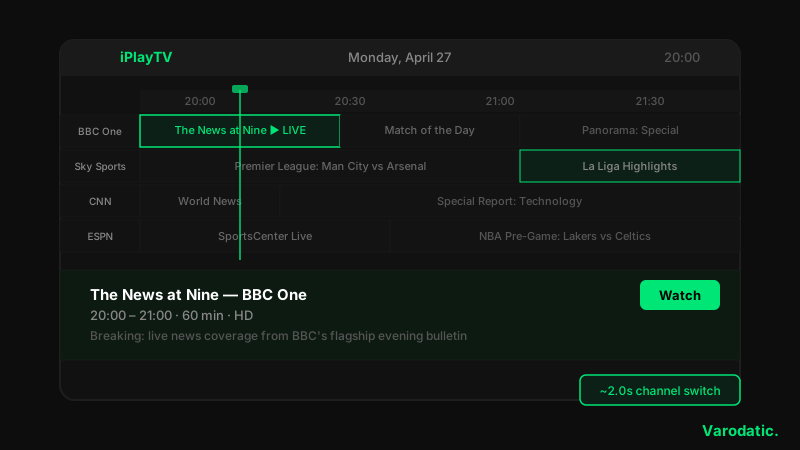
iPlayTV has been on tvOS longer than any other serious IPTV app, and it shows. The navigation, the animations, the way it responds to Siri Remote swipes — it feels like Apple designed it, not like a mobile app ported over.
Channel switch time averaged 1.8–2.2 seconds with the full Varodatic playlist. Slightly slower than IPTV One, but not something you notice in casual viewing. EPG grid navigation is smooth and loads quickly.
One detail worth correcting: some older guides say iPlayTV only supports M3U on tvOS. That is wrong. Xtream Codes is fully supported via Add Playlist → Xtream Server. EPG loads automatically once connected. You only need M3U if you prefer it or your provider does not support Xtream Codes.
4K HDR with hardware decoding works correctly. Dolby Vision passes through on Apple TV 4K. Picture-in-Picture is supported. Apple Watch quick-launch is available — a detail that shows how deeply the developer built into the Apple ecosystem.
iCloud sync works across iPhone, iPad, and Apple TV. Playlists, favorites, and watch history carry over automatically. Android and Windows users get nothing — pure Apple ecosystem only.
Real limitation: No Stalker Portal support. One-time purchase at around $5.99 — no free tier, so you are buying before you can test it on your specific provider.
Price: ~$5.99 one-time purchase.
Connect Varodatic: Add Playlist → Xtream Server → enter Server URL, Username, Password. Or use M3U Plus URL if preferred.
#3 — IPTVX: Best for Dolby Vision and Apple Ecosystem
✨ Best for HDR and Apple-Only Households
IPTVX is the best-looking IPTV app on tvOS. The channel grid layout, the EPG color coding, the transitions between sections — all of it is more visually refined than any other app tested. If that matters and everyone in your home uses Apple devices, IPTVX makes the strongest case.
Channel switch time ran 2.0–2.5 seconds. The initial app load is heavier than IPTV One or iPlayTV — there is visible rendering on first open. After that, navigation is smooth.
EPG detection via Xtream Codes API is automatic — paste your XMLTV URL and IPTVX finds it without manual channel matching. The 7-day guide loaded completely and correctly. The guide UI is the most visually impressive of all five apps.
Codec support is the widest on this list: Dolby Vision, HDR10, and HLG all supported and correctly passed through. Hardware decoding active throughout — no frame drops on 4K HEVC. A new AI-powered content panel launched in 2026 displays match stats and show recaps while watching live TV. Genuinely useful for sports, not just a marketing feature.
Real limitation: No Android, Windows, or Linux support. If anyone in your household uses a Firestick or Android TV box, IPTVX will not cover them. Free tier is limited — full features require a premium subscription.
Price: Free limited tier. Premium subscription for full access — verify current pricing in App Store.
Connect Varodatic: Add Playlist → Xtream Codes API → Server URL, Username, Password. Auto-EPG detects Varodatic's guide data.
#4 — Smarters Player Lite: Best Free Option
🆓 Best Free tvOS App
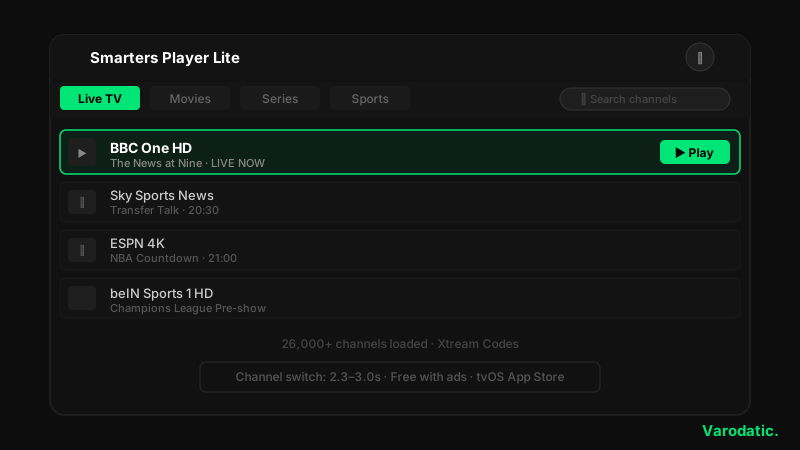
Smarters Player Lite is the Apple TV version of the most widely used IPTV app in the world. Search for it in the tvOS App Store — branding varies slightly across versions, but it is there. App Store rating is 4.6/5 as of April 2026.
Channel switch time on the full 40,000+ channel Varodatic playlist: 2.3–3.0 seconds. Noticeably slower than IPTV One and iPlayTV on large playlists. Filter down to a favorites list of 3,000 channels and the speed improves meaningfully. If you only watch a subset of channels, build that list early.
EPG loads automatically via Xtream Codes login. The tvOS EPG grid works correctly but lacks the visual refinement of IPTV One or IPTVX. For daily use it is sufficient. It is not the benchmark for EPG quality on this platform.
4K HEVC streams were stable in testing. Hardware acceleration is present. No Dolby Vision passthrough confirmed — HDR10 only. A real limitation if you have an Apple TV 4K and care about the Dolby Vision pipeline.
Real limitation: Interface designed for touchscreens. On Apple TV with a Siri Remote, navigation works but feels less native than purpose-built tvOS apps. No cloud sync across devices. Free tier includes ads — no paid option to remove them.
Price: Free with ads.
Connect Varodatic: Add New User → Login with Xtream Codes API → Server URL, Username, Password. Channels and EPG load automatically.
#5 — Chillio: Best Rising Alternative for Discovery
⭐ Best for Content Discovery and Multiview
Chillio climbed App Store ratings through 2025–2026 on the strength of two features no other app on this list offers: multiview (two streams simultaneously) and fully separate family member profiles. If those are priorities, nothing else comes close.
Channel switch time ran 2.2–2.8 seconds — slightly above IPTV One and iPlayTV, within acceptable range. Xtream Codes and M3U both supported. EPG loads automatically via Xtream Codes. Several days of guide data rendered correctly with smooth scrolling.
4K supported. HDR content handled correctly in testing. No Dolby Vision passthrough confirmed — HDR10 only, same as Smarters.
Multiview is the real differentiator. Running two streams simultaneously — a main event and a secondary channel in a corner — is handled cleanly and stays stable. iPlayTV and IPTV One both lack this. If you regularly track two sports events at once, Chillio is the only option on this list that solves it.
Family profiles let each household member maintain separate channel lists, favorites, and watch history. Practical for families where adults and children want different channel sets.
Real limitation: Smaller development team than the established apps — update cadence is less predictable. Free tier limited; full features via in-app purchase (verify current App Store pricing — it changes frequently).
Connect Varodatic: Add Playlist → Xtream Codes → Server URL, Username, Password.
Apple TV IPTV Player Feature Comparison 2026
| Feature | IPTV One | iPlayTV | IPTVX | Smarters Lite | Chillio |
|---|---|---|---|---|---|
| Native tvOS app | ✅ | ✅ | ✅ | ✅ | ✅ |
| Xtream Codes | ✅ | ✅ | ✅ | ✅ | ✅ |
| M3U | ✅ | ✅ | ✅ | ✅ | ✅ |
| Stalker Portal | ✅ | ❌ | ❌ | ❌ | ❌ |
| EPG auto-match | ✅ Auto | ✅ Xtream | ✅ Auto | ✅ Xtream | ✅ Xtream |
| 4K / HDR | ✅ Dolby Vision | ✅ HDR10 | ✅ Dolby Vision | ✅ HDR10 | ✅ HDR10 |
| iCloud Sync | ✅ All devices | ✅ Apple only | ✅ Apple only | ❌ | ✅ |
| Android sync | ✅ | ❌ | ❌ | ❌ | ❌ |
| Multiview | ❌ | ❌ | ❌ | ❌ | ✅ |
| Family profiles | ❌ | ❌ | ✅ Family Share | ❌ | ✅ |
| PiP (Apple TV) | ✅ | ✅ | ✅ | ❌ | ❌ |
| Siri Remote optimised | ✅ | ✅ | ✅ | ⚠️ Partial | ✅ |
| Price | Free / Premium | ~$5.99 one-time | Free / Premium | Free (ads) | Free / IAP |
| Channel switch speed | ~1.5s | ~2.0s | ~2.2s | ~2.5s | ~2.5s |
Most 2026 IPTV guides include GSE Smart IPTV in their Apple TV rankings. A few rank it first. Here is the problem: GSE Smart IPTV has no native tvOS app. It is not on the tvOS App Store. What those guides describe is AirPlay — streaming content from the GSE iPhone app to an Apple TV screen.
That works. But it is not an Apple TV IPTV player. You are using your iPhone as the player and your TV as the output screen. No Siri Remote EPG navigation. No tvOS interface. No background playback. No Picture-in-Picture.
GSE is excellent on iPhone and iPad — one of the best M3U players on iOS. For Apple TV specifically, it is a workaround, not a solution. Every app ranked above has a real, dedicated tvOS app available directly from the App Store. Install one of those instead.
Connecting Any App to Varodatic on Apple TV
Two methods — Xtream Codes is faster for initial setup and eliminates manual EPG configuration entirely.
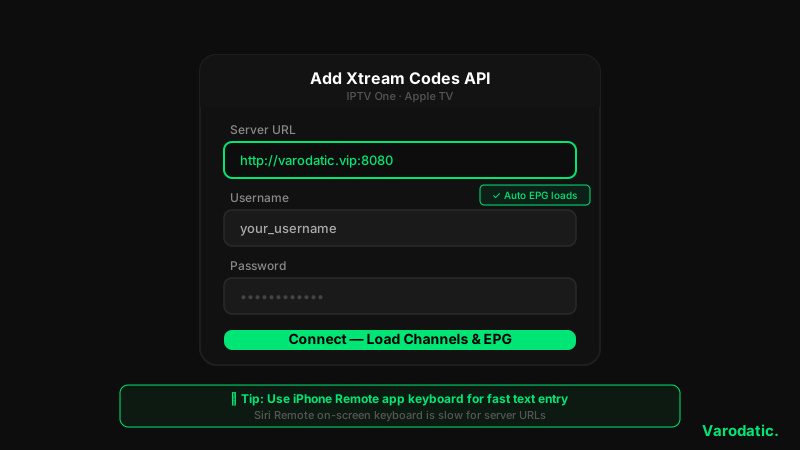
Via Xtream Codes API (recommended):Add Playlist → Xtream Codes API (or Xtream Server in iPlayTV) → enter your Varodatic IPTV Server URL, Username, and Password. Channels, EPG, and VOD load automatically. No separate XMLTV URL entry needed.
Via M3U URL (iPlayTV alternative or any app fallback):Add Playlist → Remote Playlist URL → paste your Varodatic M3U Plus URL. Add EPG URL manually in playlist settings. Use this if you prefer M3U or your plan only includes an M3U link.
💡 Use the iPhone Remote app for credential entry. The Siri Remote on-screen keyboard is painfully slow for entering server URLs. Open the Apple TV Remote app on your iPhone — it provides a full keyboard for any tvOS input field. Cuts credential entry from 3 minutes to 30 seconds.
See the full Apple TV setup guide for a step-by-step walkthrough of each app with screenshots.
Apple TV vs Firestick for IPTV — The Honest Trade-Off
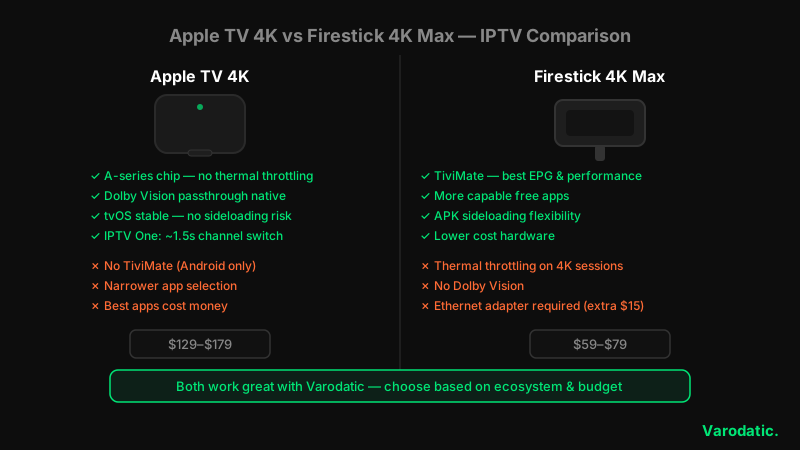
Apple TV wins on hardware. The A-series chip handles high-bitrate 4K HEVC without the thermal throttling that affects Firestick models. Dolby Vision passthrough is native. tvOS is stable — no sideloading means no malware risk and less maintenance over time.
But it loses on flexibility. TiviMate — still the benchmark for EPG quality and large-playlist performance — is Android and Fire OS only. No tvOS version exists and none has been announced. The App Store selection is narrower, and the best Apple TV IPTV apps cost money where Firestick has capable free options.
IPTV One closes most of the practical gap with TiviMate for tvOS users. But if you want TiviMate specifically, Apple TV cannot help you.
The pragmatic answer: if you already own an Apple TV, the five apps above make it an excellent IPTV device. If you are buying hardware specifically to run IPTV with TiviMate, a Firestick 4K Max costs less and handles that use case better.
See the Firestick IPTV guide for the full setup walkthrough, and best IPTV players for Firestick for the ranked player comparison on Fire OS.
Frequently Asked Questions
What is the best IPTV app for Apple TV in 2026?
IPTV One is the top pick for Apple TV in 2026 — the only tvOS-native app that supports Xtream Codes API, Stalker Portal, and cross-platform cloud sync covering both Apple and Android devices. iPlayTV is the best alternative for users who want the most polished pure-tvOS interface and are happy with a one-time $5.99 purchase. For a fully free option, Smarters Player Lite works but navigates less smoothly on the Siri Remote.
Is TiviMate available on Apple TV?
No. TiviMate is an Android-only application — it runs on Android TV, Firestick, and Android TV boxes. There is no tvOS version and none has been announced. The closest equivalent on Apple TV for EPG quality is IPTV One, which offers a grid guide built natively for tvOS and Siri Remote navigation.
Does GSE Smart IPTV work on Apple TV?
Not natively. GSE Smart IPTV has no tvOS app on the App Store. Guides recommending it for Apple TV are describing AirPlay from an iPhone — which sends the video stream to an Apple TV screen but uses the iPhone as the player. You get no Siri Remote navigation, no tvOS EPG interface, and no proper Apple TV integration. For a real tvOS IPTV experience, use IPTV One, iPlayTV, IPTVX, Smarters Player Lite, or Chillio.
Which Apple TV IPTV app supports Xtream Codes?
IPTV One, IPTVX, Smarters Player Lite, and Chillio all support Xtream Codes API login on tvOS. iPlayTV supports Xtream Codes via Add Playlist → Xtream Server. Xtream Codes is the recommended connection method for Varodatic — it loads channels, EPG, and VOD automatically without any manual configuration. See Xtream Codes vs M3U for the full breakdown of both methods.
Can I use the same Varodatic credentials on both Apple TV and iPhone?
Yes. Your Varodatic Xtream Codes credentials — Server URL, Username, Password — work across multiple devices simultaneously, depending on your plan. IPTV One and IPTVX both offer iCloud sync — configure on iPhone and the same playlists, favorites, and EPG settings appear on Apple TV automatically. Check your Varodatic plan to confirm your connection limit.
IPTV One for most Varodatic users. iPlayTV if the one-time purchase suits you and you are deep in the Apple ecosystem. Smarters Player Lite if you want to test without spending anything first. Skip GSE for Apple TV specifically — excellent on iPhone, not a tvOS app. The setup for any of them is the same: App Store → install → add your Varodatic Xtream Codes credentials → channels and EPG load automatically. Start your Varodatic free trial to get your credentials and test any of these apps today.
Related Articles

Do You Need a VPN for IPTV? Honest 2026 Guide
Not sure if you need a VPN for IPTV? We break down exactly when a VPN helps, when it doesn't, and which ones actually work — no hype, just honest advice.
Read Article
Best IPTV Players for 4K Streaming in 2026 (Ranked & Tested)
We tested every major IPTV player with Varodatic 4K streams. Here are the top 7 apps ranked by performance, EPG quality, and compatibility.
Read Article
How to Watch IPTV on Apple TV: Best Apps & Complete Setup Guide (2026)
Watch Varodatic IPTV on Apple TV in minutes. We cover the best tvOS apps — iPlayTV, GSE Smart IPTV, Smarters — with a full step-by-step setup guide for 2026.
Read Article